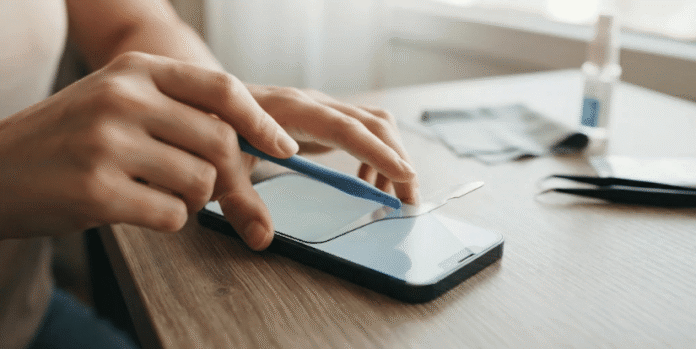
Removing a protective layer from your phone is usually simple, but rushing can create unnecessary risks. If you want to know how to remove screen protector material safely, start at one corner and peel slowly. Avoid knives, metal tools, excessive heat, and force against the display.
| Quick fact | Recommended approach |
|---|---|
| Best starting point | An undamaged corner or edge |
| Safest tools | Fingernail, plastic card, tape, microfiber cloth |
| Cracked tempered glass | Cover cracks with clear tape before lifting |
| Stubborn adhesive | Use brief, gentle warmth if the manufacturer allows it |
| Cleaning afterward | Soft, lint-free microfiber cloth |
| Foldable inner displays | Check manufacturer guidance before removing anything |
| Reusing old protection | Usually not recommended |
Quick answer: Power off the device and remove its case before starting. Lift one corner with your fingernail, tape, or a thin plastic card, then peel the layer slowly. If the glass is cracked, tape across it first so loose fragments remain together during removal.
What You’ll Need Before You Start
You usually need only a few household items for this job. Gather a microfiber cloth, plastic card, and clear adhesive tape before touching the phone. Protective gloves are also useful when broken tempered glass has sharp edges.
Keep metal blades, screwdrivers, tweezers, and pins away from the display. Their hard edges can scratch glass, damage a bezel, or slip into a device opening. A flexible plastic card gives you far better control around delicate edges.
Your work area also matters more than it may seem. Choose a well-lit table where you can see cracks, dust, and raised corners. Place a clean towel underneath if the protective glass has already shattered.
How to Remove Screen Protector Material in 6 Safe Steps
The safest method uses steady pressure, not force. Most tempered-glass and flexible-film products release once an edge separates from the display. Follow these steps in order and stop if the phone itself appears damaged.
- Turn off the phone or tablet. Disconnect charging cables and remove the case. Place the device face-up on a stable surface.
- Inspect every corner. Look for a slightly raised or undamaged edge. Start there instead of forcing it under the center.
- Lift one corner carefully. Use your fingernail or the edge of a thin plastic card. You can also attach tape to the corner and pull upward gently.
- Work around the edge. Slide the plastic card beneath the raised section without pressing toward the display. Move slowly until more adhesive releases.
- Peel at a shallow angle. Pull the protector back gradually instead of lifting it straight upward. Slow movement reduces bending and helps tempered glass remain in one piece.
- Inspect and clean the display. Check for adhesive residue, glass particles, or dust before installing anything new. Use a soft microfiber cloth rather than scraping stubborn spots.
The process should feel controlled throughout the removal. Stop if you need significant force to move the plastic card. A strongly bonded layer may need a different technique, not harder pulling.
Phone owners interested in other device-related guidance can also read ENF Blogs’ government phone transfer guide. It covers another common situation where careful preparation protects your data and device access. The same cautious approach is useful whenever you change phone hardware or services.
How to Remove Cracked Tempered Glass
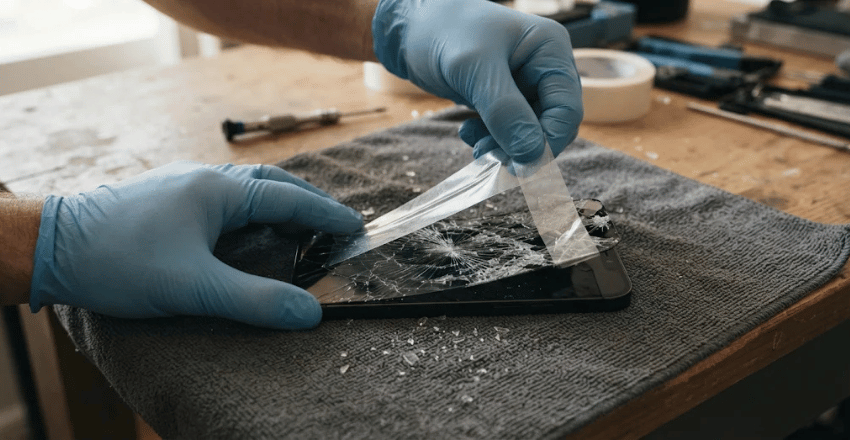
Cracked protective glass needs more care because small pieces may separate when you lift it. Start by putting wide clear tape across the cracked surface. The tape helps hold loose sections together while you peel.
Wear protective gloves if the damage has created sharp or missing pieces. Start from the least damaged corner instead of digging directly into a crack. Keep the phone over a towel so small fragments are easier to contain.
Pull the taped glass backward slowly and evenly. If one fragment separates, use another piece of tape to pick it up. Don’t brush tiny shards across the phone, as they may scratch exposed surfaces.
Most repair specialists favor slow corner lifting and extra care with broken tempered glass, and many suggest starting from an edge. Patience is safer than trying to finish the job in one quick pull.
What to Do When the Protector Won’t Come Off
Strong adhesive, age, and heat exposure can make a protective layer harder to lift. First, try a different corner rather than repeatedly prying at one resistant area. A tape tab can sometimes create enough grip without placing a tool beneath the edge.
Gentle warmth may help some adhesive-backed products release more easily. If you use a hair dryer, keep it on a low setting and keep it moving. Never heat the phone aggressively, because excessive heat can affect batteries, displays, and adhesive inside the device.
Stop immediately if the device becomes noticeably warm. Let it cool before trying another corner with a plastic card. Never substitute a heat gun, open flame, or other concentrated heat source.
What If Adhesive Is Left on the Display?
Most quality protective layers should leave little residue after removal. Start with a clean, dry microfiber cloth and wipe gently across the affected area. Do not scrape dried adhesive with a razor or other hard object.
For compatible devices, a lightly dampened cleaning wipe may help remove residue. Apply liquid to the cloth rather than pouring or spraying it onto the phone. Keep moisture away from speakers, charging ports, buttons, and other openings.
Apple’s device-cleaning advice recommends soft, lint-free materials and keeping moisture away from openings. Apple also warns against spraying cleaners directly onto its products. Owners of other brands should check their manufacturer’s cleaning instructions before applying any chemical.
Wait until the display is completely clean and dry before adding a replacement. Trapped dust can create bubbles and reduce adhesion under the new layer. Taking an extra minute here usually produces a cleaner installation.
Can You Remove Protection From a Foldable Phone?
Foldable phones require different handling because their inner displays are softer than conventional smartphone glass. A preinstalled inner film may be part of the manufacturer’s intended display system. Treat it differently from an aftermarket accessory placed on a standard phone.
Samsung currently advises Galaxy foldable owners not to remove the protective top layer themselves. The company recommends an authorized service location when that layer needs replacement. Review your manufacturer’s care guidance before touching an inner display.
Google gives similar advice for supported Pixel foldable devices. Its safety guidance says users should not peel back the preinstalled protective layer. Removing it can damage the softer folding display.
These warnings do not mean every removable accessory on a foldable is permanent. An aftermarket cover placed on an outer display may still use normal removal methods. Identify exactly which layer you are touching before lifting an edge.
Readers comparing wearable devices can also explore ENF Blogs’ smartwatches for iPhone and Android users. That article provides related technology coverage for readers managing several connected devices. It can also help users consider compatibility before buying accessories.
Common Mistakes to Avoid
The biggest mistakes happen when speed replaces control. Metal blades may seem useful for reaching underneath a tight edge, but they can scratch the display. Pulling sharply can also break tempered glass into smaller pieces.
Avoid pouring rubbing alcohol, cleaning solution, or water directly onto the device. Liquid can migrate through speaker openings or gaps around buttons. Put approved cleaner on a cloth only when your device manufacturer permits it.
Do not keep forcing an edge that refuses to move. Try another corner, use tape for grip, or check the product manufacturer’s instructions. A repair professional is the safer choice when the display itself looks cracked.
You can find more mobile-technology material in ENF Blogs’ guide to tracking issues with applications. It focuses on software rather than hardware, but it expands the site’s practical technology coverage. Keeping both hardware and software in good condition can extend a phone’s useful life.
Should You Reuse the Old Protective Layer?
Reusing an adhesive-backed layer is rarely ideal after complete removal. Dust can settle on the exposed adhesive within seconds. That contamination often produces bubbles, weak edges, or visible particles after reinstallation.
Flexible film sometimes tolerates careful repositioning during initial installation. That is different from removing an older product after months of use. Once adhesive has aged and collected debris, replacement usually gives cleaner results.
Inspect the phone before applying anything new. Make sure no glass fragments, adhesive spots, or lint remain on the surface. Follow the manufacturer’s replacement instructions because installation methods vary by product.
When Should You Get Professional Help?
Professional help makes sense when you cannot tell whether the crack affects the accessory or the phone itself. You should also stop if removing an edge seems to lift part of the display. Continuing could turn a small accessory problem into an expensive repair.
Foldable inner displays deserve extra caution because manufacturers may restrict user removal. Devices with deep cracks, bent frames, or exposed internal parts also need specialist inspection. Do not keep pressing or prying around visibly damaged hardware.
A technician can inspect the display before removing the remaining material. That may cost more than a home removal, but it reduces uncertainty around expensive screens. It is especially sensible when the device remains under a warranty or protection plan.
Frequently Asked Questions
Can removing a protective layer damage a phone screen?
Careful removal normally should not damage an intact conventional display. The main risks come from sharp tools, excessive force, high heat, and accidental glass fragments. Foldable inner displays require special attention because manufacturer instructions may prohibit user removal.
How do I know whether the protector or actual screen is cracked?
Inspect the damage under strong light and look closely at the edges. A crack confined to the upper removable layer may stop before reaching the phone’s display. Get professional help when you cannot identify which surface is damaged.
Can I use a credit card to lift the edge?
A plastic card can work when used gently. Keep the card almost parallel to the screen, rather than pushing its edge downward. Stop if the card requires strong pressure to move.
How do I remove screen protector glass when it is shattered?
Place clear tape over the broken glass before attempting removal. Lift from the least damaged corner and peel backward slowly. Wear gloves when sharp pieces are exposed, and collect loose fragments with tape.
Is a hair dryer safe for loosening adhesive?
Low, brief warmth may help with some stubborn adhesive products. Keep the dryer moving and stop if the device becomes warm. Check your device and accessory instructions before using heat.
Can I install a new protector immediately afterward?
Yes, provided the display is intact, clean, and completely dry. Remove all dust and residue before starting the new installation. Follow the new product’s alignment and cleaning instructions for the best result.
The Safest Approach Is a Slow One
Removing old protective glass or film does not require complicated equipment. A fingernail, plastic card, tape, and patience are enough for most standard phones. Cracked glass needs extra containment, while stubborn adhesive needs careful handling.
Check manufacturer instructions before touching special displays or factory-installed layers. This is especially important with modern foldable devices. When the actual screen looks damaged, professional service is safer than further prying.