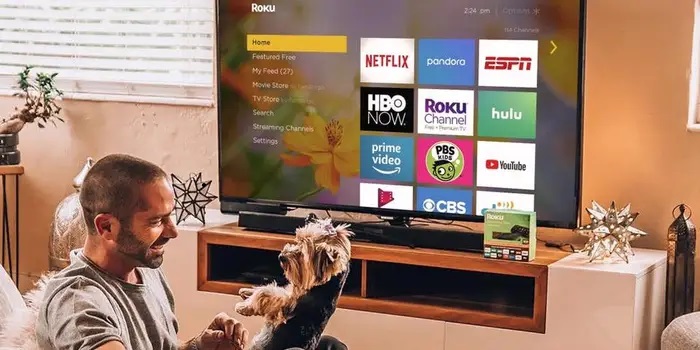
As the world of entertainment continues to shift towards streaming platforms, devices like Roku have become central to how people consume content. Roku, one of the leading streaming platforms, offers developers a powerful opportunity to create and launch their own apps, known as “channels,” for millions of users worldwide. This article will delve into the essentials of Roku app development, from getting started with the platform to launching your app and beyond.
Roku is a widely used streaming platform that allows users to access thousands of channels, including popular services like Netflix, Hulu, and Disney+. It is known for its user-friendly interface, affordability, and accessibility across multiple devices, including Roku sticks, smart TVs, and soundbars.
Roku’s developer ecosystem allows brands, content creators, and developers to build custom channels to distribute content directly to users. Whether it’s on-demand video, live TV, or niche content, Roku provides a robust platform for app developers to reach a large audience.
Why Develop for Roku?
Developing for Roku offers several advantages:
- Large User Base: Roku passed 90 million streaming households in early 2025, providing a broad audience for your content.
- Customizable Channels: You have full control over the design, functionality, and monetization of your app.
- Flexible Monetization: Roku supports multiple revenue streams, including advertisements, subscriptions, and in-app purchases.
- Lower Barriers to Entry: Developing and submitting a Roku channel is more accessible than on platforms like Apple TV or Amazon Fire TV.
By building a channel on Roku, you gain direct access to a global audience that is highly engaged in streaming content.
Getting Started with Roku App Development
Before you can begin developing your Roku app, you’ll need to complete a few setup steps:
- Roku Developer Account: Sign up for a Roku Developer Account, which will give you access to the development tools and documentation you need.
- Roku Device: Purchase a Roku device for testing. While you can use Roku’s software emulator, testing on real hardware ensures that your app performs correctly.
- SDK Tools: Roku’s Software Development Kit (SDK) includes all the necessary resources to build and test your channel.
The two main options historically were the Roku SDK and Direct Publisher. The SDK allows for custom app development using BrightScript, while Direct Publisher offered a no-code way to distribute content. Roku retired Direct Publisher in early 2024, so new channels are now built with the SDK, either in-house or through third-party app builders that generate SDK-based apps.
Understanding Roku’s Development Framework: BrightScript
Roku app development relies on BrightScript, a powerful scripting language specifically designed for building Roku channels. Unlike other languages like JavaScript or Python, BrightScript is optimized for Roku’s unique hardware, allowing for efficient performance and smooth user experiences.
- SceneGraph: Roku’s UI framework, SceneGraph, allows developers to build interfaces with high levels of customization. SceneGraph handles elements like video playback, images, and text, ensuring smooth navigation and interaction.
- BrightScript Basics: Developers familiar with other programming languages will find BrightScript relatively straightforward. It includes common programming concepts such as loops, conditionals, and functions, making it easy to learn and implement.
Designing the User Interface (UI)
An essential part of Roku app development is creating an intuitive and engaging user interface. Roku channels follow specific design guidelines to maintain a consistent user experience across the platform. Consider the following:
- Simple Navigation: Ensure that users can easily browse through content and find what they are looking for without confusion.
- Responsive Design: Your UI should adapt to different screen sizes, from standard TVs to larger smart displays.
- Custom Themes: Roku allows developers to create custom themes that reflect their brand’s identity, giving your app a unique look and feel.
Utilizing Roku’s SceneGraph will help you efficiently manage UI components and deliver a smooth user experience.
Building and Testing Your Roku App
Once you’ve designed your UI and written your BrightScript code, the next step is to build and test your app. Roku provides tools to help with this:
- Roku Device or Emulator: Use either the Roku device or the official emulator to test the functionality of your app.
- Roku Developer Dashboard: The developer dashboard allows you to sideload your app onto your Roku device for testing.
- Debugging Tools: Roku provides debugging tools that help you monitor performance and catch errors during development.
It’s crucial to perform extensive testing across different devices to ensure that your app works flawlessly for all users.
Monetization Strategies for Roku Channels
Roku offers various monetization options to generate revenue from your channel:
- Advertisements: Leverage Roku’s built-in ad network to insert ads into your content.
- Subscriptions: Offer premium content behind a subscription paywall.
- Pay-Per-View: Allow users to pay for specific content such as movies or live events.
- In-App Purchases: Provide users with additional content or features through microtransactions.
Choosing the right monetization strategy depends on your content and target audience.
Submitting and Publishing Your Roku Channel
Once your app is built and tested, you can submit it to the Roku Channel Store. The process involves:
- App Submission: Submit your app through the Roku Developer Dashboard. Ensure that all content adheres to Roku’s guidelines.
- App Review: Roku will review your channel for compliance with technical and content standards.
- Publishing: Once approved, your channel will be listed in the Roku Channel Store, making it accessible to millions of users.
Maintaining and Updating Your App
App maintenance is crucial to ensure continued success on the Roku platform. Regular updates will keep your content fresh and address any performance issues or bugs. Additionally, listening to user feedback can help you improve the overall user experience and stay competitive in the crowded streaming market.
Conclusion
Roku app development offers a great opportunity to tap into the growing streaming market. By understanding the platform’s ecosystem, mastering BrightScript, and carefully designing your user experience, you can create a successful Roku channel. Whether you’re a content creator, media company, or developer, building for Roku allows you to reach a large, engaged audience while leveraging multiple monetization strategies.
Apart from this, if you would like to know about “iPhone 14 Pro Max vs” then please visit our “Technology” category.